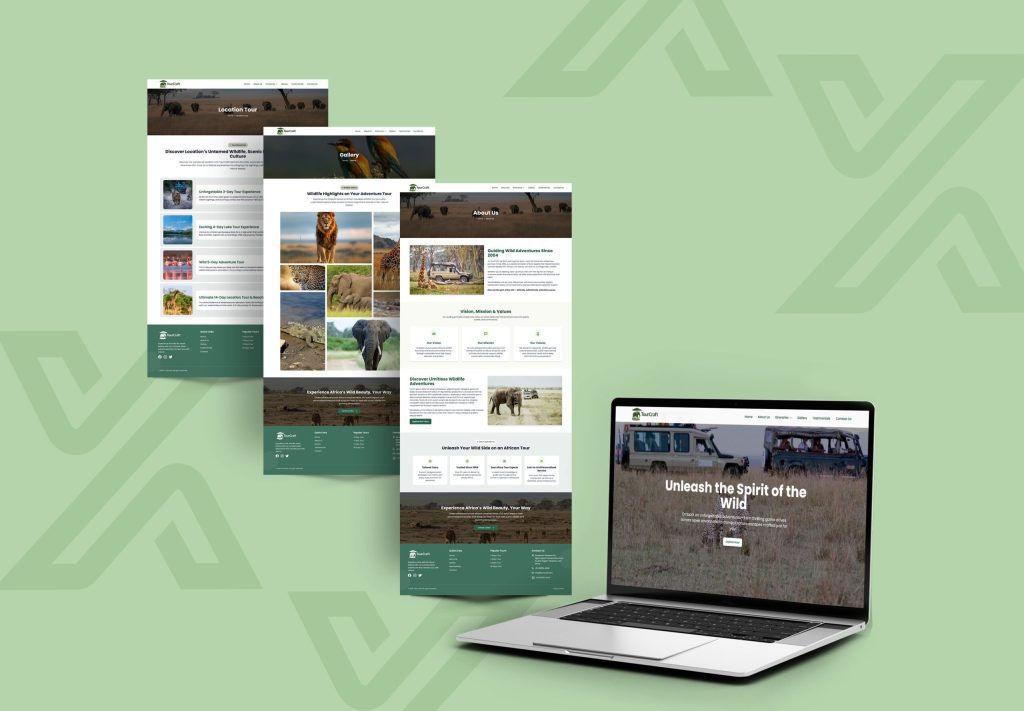
How to Choose the Best Tour Operator Website Template for Your Business
Look for a template that is optimized for speed, mobile responsiveness, includes a responsive architecture for your website, is SEO schema ready, and provides seamless integration with booking engines or inquiry forms that handle tours. Templates, such as TourCraft and Travel Buddy on Themixly Travel & Tourism Collection allow you to save hundreds of development hours and get maximum online bookings with pre-built components.
Why Is Selecting the Right Travel Website Template Essential?
One of the most important business choices of a tour operator or travel agency is choosing the correct website template. Your website is like your open shop around the clock with stunning locations, advanced daily plans, user feedback and tour rates.
In this guide, you will see what to consider when analyzing the suitability of a travel website template. Whether it’s the performance tech stack or structured data layouts, mobile navigation or the SEO capabilities, we will explore some of the most important features so you can choose a template that turns your visitors into booked travelers.
What Key Features Must Every Tour Operator Template Include?
Not every website template will be suitable for what you want to accomplish with your travel business website. While simple corporate templates focus on text, a tour operator template needs to make sure to stand out with the visual itineraries and intricate travel arrangements.
In addition to these features, a travel template should include the following:
- Interactive Tour Package Grids: Present tour packages with badges for pricing, duration and size of the tour. Clean multi-column layouts (3 column or 4 column) to present tours/packages with badges for pricing, duration, and group size.
- Day-by-Day Itinerary Layouts: Organised timetables that can be displayed day by day, showing the itinerary activities clearly.
- High-Impact Media Galleries: High impact image grids and hero headers that support high resolution destination photography without compromising page load speeds.
- Clear Call-to-Action (CTA) Buttons: Buttons with “Book Now,” “Enquire Today” or “Download Itinerary” as the call to action to generate conversions.
- Filterable Search Features: Easy filtering by destination, activity type (e.g., adventure, luxury, family), budget range, and duration.
How Does Tech Stack Impact Website Speed and Search Rankings?
Comparison: React/Next.js vs. Traditional HTML/Wordpress Templates
| Feature / Attribute | React 18/19 & Tailwind CSS (e.g., Themixly) | Traditional Monolithic Frameworks |
|---|---|---|
| Page Load Speed | Ultra-Fast (Vite/Next bundling, client hydration) | Moderate to slow (depends heavily on hosting and plugins) |
| Mobile Experience | App-like smoothness, highly responsive 3/4-column grids | Responsive, but often bloated with script dependencies |
| Code Structure | Modular TSX/JSX components; easy for developers to customize | Spaghettified code; high plugin conflict risk |
| SEO & AEO Readiness | Clean DOM tree, high Core Web Vitals performance | Requires heavy caching and performance optimization plugins |
| Recommended Option | TourCraft or Travel Buddy | Heavy traditional themes |
Step-by-Step Checklist for Choosing Your Tour Operator Template
The following is a 5-step process to consider when purchasing a travel website template:
- Verify Mobile-First Responsiveness: Mobile-First Responsiveness – More than 65% of travel searches take place on a cell phone. Test live preview on various screen sizes to make sure that navigation functions well on smartphones.
- Review Code Quality and Stack: Ensure the template utilizes modern standards like React 18+, Tailwind CSS, or clean TypeScript/JSX files.
- Inspect Pre-built Travel Pages: Confirm the package includes dedicated pages for Destinations, Tour Details, About Us, Testimonials, Travel Blog, and Contact.
- Evaluate SEO and Schema Compatibility: Check if headings follow strict H1 > H2 > H3 hierarchy and if structured data can be easily embedded.
- Check Licensing and Updates: Ensure there is a consistent H1 > H2 > H3 hierarchy and that the structured data can easily be incorporated.
Top Recommended Templates on Themixly
If you want a modern, high-performing template specifically designed for your companies, explore these top selections from Themixly Travel & Tourism Collection:
1. TourCraft – React & Tailwind Travel Template
- Best For: Travel agencies, adventure tour operators, and vacation planners.
- Key Features: Built with React 18, Tailwind CSS, Vite, and TypeScript. Features a responsive 4-column grid layout, modular TSX components, trip planner sections, and fast loading speeds.
- Direct Link: Explore TourCraft React Template.
2. Travel Buddy – React Travel Company Template
- Best For: Destination management companies, tour operators, and luxury holiday planners.
- Key Features: Powered by React 19+, 3-column grid design, package-focused layout, clean JSX architecture, and optimized cross-browser compatibility.
- Direct Link: Explore Travel Buddy React Template.
How to Optimize Your Travel Template for Search Engines and AI Engines
To rank on Google and get picked up as cited material by AI search engines, your site really needs to mix tidy code with a clear content setup that answers things fast.
- Implement Schema.org Structured Data: on every tour detail page, insert TouristTrip and Offer schema markup, so search engines can show those nice little rich results, with price , duration, and rating.
- Structure Content for Answer Engine Optimization (AEO): keep the content in a way that’s easy to read, and easy to quote. Add small summaries of about 40–80 words under major headings, so AI tools can parse it without too much hassle or extra searching.
- Optimize Image Assets: Compress destination photos using WebP formats and write descriptive ALT text containing location and tour keywords.
- Maintain Fast Core Web Vitals: Choose lightweight React templates to pass Google’s Largest Contentful Paint (LCP) and Cumulative Layout Shift (CLS) thresholds.
Frequently Asked Questions (FAQs)
What is the difference between a general business template and a tour operator website template?
Tour templates include specialized features like daily itinerary builders, tour package cards, destination filters, pricing tables, and booking forms.
Do React travel templates support SEO and Google indexing?
Yes. Modern React travel templates index easily when using SSR, SSG, or clean pre-rendering architectures.
Can I integrate online booking engines into templates like TourCraft or Travel Buddy?
Yes. Their modular codebase supports integration with payment gateways, booking engines, and custom APIs.
How important is mobile optimization for a tourism website?
It is critical because most leisure travelers research and book tours directly on smartphones.
Final Checklist: What to Do Next
Ready to build or upgrade your tour operator website? First, audit your current website needs by listing your required features like booking forms or itinerary grids. Next, browse the Themixly Travel & Tourism Category to preview live demos. Then, choose modern React templates like TourCraft or Travel Buddy for top performance, and finally customize the template with your branding, photos, and tours to launch your site