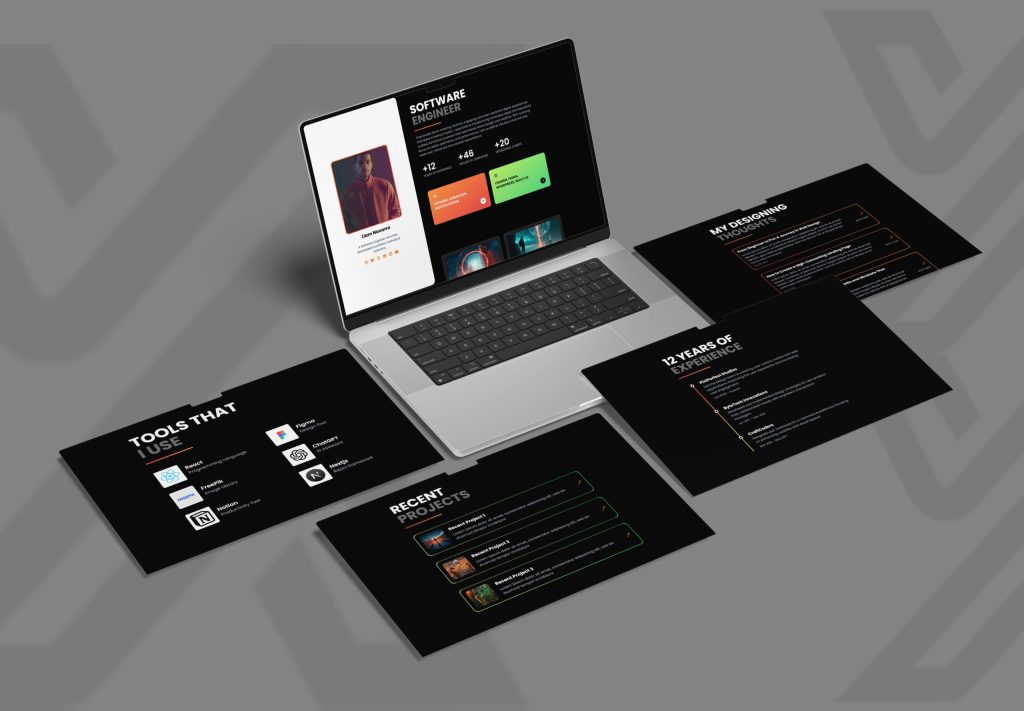
Best Minimalist Portfolio WebsiteTemplates Built with Next.js and Tailwind
The most effective minimalist portfolio templates include modern tools and technology, such as Next.js 15, React 19, and Tailwind CSS 3+, to ensure your website loads quickly while providing a clean 2-column or grid layout and a modularized TSX structure. Tops tools, like PortFoliofy from Themixly, focus on speedy visual storytelling, small bundle size and responsive design for developers, designers, and creators who wish to see their traffic turn into clients.
What Will You Learn in This Portfolio Template Guide?
Your personal portfolio website isn’t just your online resume, it’s your online persona and your major client conversion machine. From the time you are found to even before you get to the interview stage, prospective employers and clients judge your abilities within seconds. Choosing a clean, clutter-free template will keep your work as the main focus, without any slowdowns in your scripts or anything else in your UI.
This tutorial will cover the benefits of using Next.js and Tailwind CSS for your portfolio site, the best performing minimalist templates, and how to optimize your developer showcase for modern Artificial Intelligence powered Search Engine Optimization (SEO) and Answer Engine Optimization (AEO).
Why Choose Next.js and Tailwind CSS for Minimalist Portfolios?
Next.js and Tailwind CSS are a perfect match for building a web portfolio that assures both developer speed and user performance. When it comes to light design, traditional site builders tend to load in heavy scripts and bulky sets of files, and slow responses from the server.
Next.js (SSR/Static Generation) + Tailwind CSS (Utility Styling)
│
▼
Fast Load Times + High Performance Metrics
│
▼
Better SEO/AEO Search Engine Rankings & AI Citations
Core Technical Advantages
- Server-Side Rendering (SSR) & Static Site Generation (SSG): Next.js pre-renders pages when you build them, or when they are requested, to serve lightweight HTML to web crawlers and AI search agents.
- Utility-First Styling: Utility-First Styling and it is optimized to compile down to a very small and purgeable CSS, so as to keep page payloads compact and minimize layout shifts.
- Modular Codebase: Modern TypeScript (TSX) components ease the task of updating project entries, resume fields and skill tags without compromising site layout.
- Instant Visual Delivery: The gallery-level optimization of images at the framework level results in fast loading of high-resolution images across mobile devices.
Top Minimalist Portfolio Templates by Themixly
If you choose a ready to use template, then clean design is a priority to save the time required for development. Themixly creates developer-friendly templates that are powered with modern stacks such as React 19, Next.js 15 and Tailwind CSS.
1. PortFoliofy – Minimalist Developer & Personal Portfolio
PortFoliofy is a no-frills portfolio template designed with the software developer, freelancer, and UI designer in mind.
- Tech Stack: React 19, Next.js 15, Tailwind CSS 3+.
- Layout: Responsive layout with a 2 column grid design for reading on all devices.
- Key Features: Integrated resume layout, project showcase gallery, skills highlights and functional contact forms.
- Performance: Pre-configured with Next.js configs and TypeScript files (TSX) for fast server loading.
2. Photolio & Artistry – Visual & Creative Portfolios
Themixly is a niche showcase layout that is optimized for visual artists, photographers and video artists, with special emphasis placed on high-resolution image galleries.
Minimalist Portfolio Template Features Comparison
| Template Name |
Primary Focus | Tech Stack |
Layout Style |
Ideal User |
|---|---|---|---|---|
| PortFoliofy | Personal Branding & Code Showcase |
Next.js 15, React 19, Tailwind CSS |
2-Column Grid |
Software Engineers, Freelancers, Tech Consultants |
| Photolio | Visual Storytelling & Photography |
React 19+, Next.js, Tailwind CSS |
3-Column Image Grid |
Photographers, Videographers, Graphic Artists |
| Artistry | Fine Art & Project Exhibition |
React 19+, Next.js, Clean JSX |
Minimalist Gallery |
Illustrators, Painters, Digital Sculptors |
How to Choose the Right Portfolio Template for Your Brand
Choosing a portfolio site involves matching design choices to your target audience’s user journey.
Essential Selection Checklist
- Prioritize Mobile Responsiveness: Over 50% of creative directors and hiring managers review portfolio links on mobile devices. Verify that navigation menus collapse seamlessly into a clean drawer.
- Inspect Code Quality: Opt for templates built with TypeScript (.tsx) and standard Tailwind utility classes to ensure long-term maintainability.
- Verify Built-In Business Pages: Ensure the layout includes dedicated modules for services, client testimonials, and clear call-to-action buttons (CTAs).
- Test Page Load Speed: Lightweight templates should score 90+ on Google PageSpeed Insights out of the box to maximize search discoverability.
Frequently Asked Questions
What makes Next.js and Tailwind CSS better than traditional WordPress portfolios?
Next.js offers static generation and server-side rendering, which result in significantly faster page loading speeds than traditional database-driven CMS platforms like WordPress. Tailwind CSS eliminates redundant stylesheets, ensuring that portfolio pages stay lightweight and easy to maintain.
How does a minimalist portfolio template boost SEO and AEO performance?
A minimalist layout reduces DOM node depth and clutter. Modern AI search engines (AEO) and conventional web crawlers (SEO) can parse structured data, semantic HTML5 headings, and clear project text without wading through non-essential scripts or heavy layouts.
Can I customize PortFoliofy if I am not an expert developer?
Yes. PortFoliofy features modular TSX components with clear code organization. Developers or creators with basic knowledge of JavaScript/React can easily update text fields, update links, adjust Tailwind theme colors, and swap out images.
Is PortFoliofy mobile-friendly across all web browsers?
PortFoliofy is built with a responsive mobile-first 2-column grid system. It provides cross-browser compatibility across major browsers including Google Chrome, Mozilla Firefox, Apple Safari, Opera, and Microsoft Edge.
What to Do Next
To launch your digital identity, start by exploring ready-to-use options like PortFoliofy on Themixly’s Portfolio Theme Category to find a layout that aligns with your workflow. Next, gather 4–6 of your best projects alongside concise descriptions, live links, and repository access. Finally, deploy your Next.js and Tailwind CSS setup on platforms like Vercel or Netlify for instant global delivery. For detailed setup guidelines, review the official Vercel Next.js Documentation.